Top 15 Smart Uses of Webcam in 2026
Published: 12 Nov 2026
Travelling for meetings, attending physical classes, and communicating with people in distant locations can take time and money. The Uses of Webcam make many of these activities easier by supporting virtual meetings, remote learning, interviews, consultations, and personal calls. A webcam allows users to communicate visually without being in the same place. With proper lighting and a stable internet connection, it can provide a smooth and convenient experience.
1. What Is a Webcam and How Does It Work?
A webcam is a small digital camera that captures live video through a computer, laptop, or another compatible device. It may be built into the screen or connected externally through a USB port. The webcam lens collects light from the person or object in front of it and directs it toward the image sensor. This sensor converts the captured light into digital video signals. The internal processor then adjusts the colour, brightness, focus, and image quality. After processing, the webcam sends the video to a camera, meeting, recording, or streaming application. If it includes a built-in microphone, it also records and transfers sound with the video.
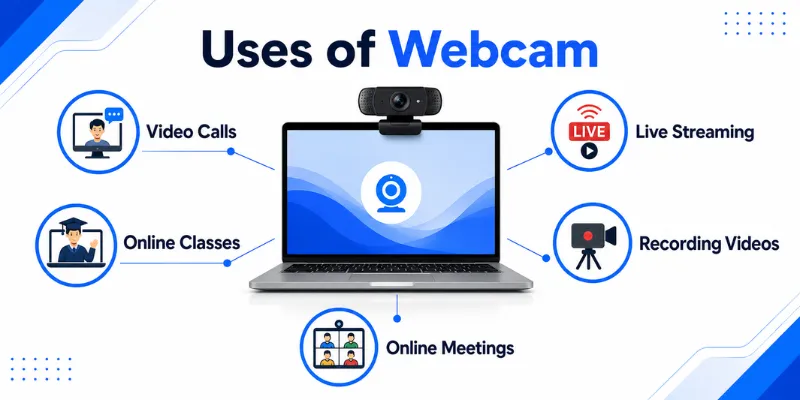
2. Main 12 Uses of Webcam
A webcam is useful for much more than simple video calling. It supports communication, education, business, healthcare, entertainment, content creation, and many other online activities. Below are the 12 main uses of webcam in detail.
1. Video Calls
One of the most common uses of a webcam is making video calls with family, friends, or colleagues. It allows people to see and speak with each other in real time, even when they live in different cities or countries. Video calls make online communication more personal because users can see facial expressions and body language. A stable internet connection, proper lighting, and clear audio can make the experience smoother.
2. Online Classes
Webcams are widely used by students and teachers during online classes. Teachers can explain lessons, demonstrate activities, and interact with students through live video. Students can ask questions, give presentations, and participate in group discussions from home. A webcam also helps create a classroom-like environment during remote learning.
3. Business Meetings
Companies use webcams for virtual meetings with employees, clients, and business partners. Team members can discuss projects, share updates, solve problems, and make decisions without meeting physically. This saves travel time and reduces meeting costs. Webcams are especially useful for remote and hybrid working environments.
4. Job Interviews
Many employers conduct job interviews through video-calling platforms. A webcam allows candidates and interviewers to communicate face to face from different locations. It saves travelling expenses and makes it easier for companies to interview people from other cities or countries. Proper camera positioning, lighting, and a clean background can help candidates appear more professional.
5. Live Streaming
Gamers, teachers, influencers, and content creators use webcams for live streaming. The camera displays the creator’s face while they play games, teach a lesson, discuss a topic, or interact with viewers. Live video makes the stream more engaging and allows viewers to see real-time reactions. Higher resolution and frame rate can provide smoother and clearer footage.
6. Video Recording
A webcam can record tutorials, presentations, lessons, demonstrations, and short videos. The footage can be saved directly to the computer and edited later. This makes webcams useful for beginners who want to create content without buying an expensive camera. Good lighting and a clear microphone can improve the final recording quality.
7. Remote Work
Webcams play an important role in remote work by helping employees communicate visually. Workers can join daily meetings, give presentations, discuss tasks, and stay connected with team members. Seeing colleagues during online conversations can improve communication and teamwork. It also helps managers maintain better interaction with remote employees.
8. Telehealth Appointments
Webcams allow patients to attend some medical consultations from home. Doctors and healthcare professionals can discuss symptoms, provide general advice, and conduct follow-up appointments through video calls. This can reduce unnecessary travelling and make basic healthcare support more accessible. However, serious medical problems may still require an in-person examination.
9. Online Training and Webinars
Businesses, schools, and professionals use webcams to conduct online training sessions and webinars. Trainers can explain topics, demonstrate processes, answer questions, and interact with participants live. Attendees can join from different locations without paying travel or venue costs. Recorded sessions can also be shared later with people who could not attend.
10. Content Creation
Webcams are useful for creating tutorials, product reviews, reaction videos, online courses, podcasts, and educational content. Creators can record themselves while explaining a topic or demonstrating a product. They can also combine webcam footage with screen-recording software. This allows them to show both their face and computer screen in the same video.
11. Online Customer Support
Some companies use webcams to provide visual customer support. Support agents can demonstrate how to use a product, identify basic technical problems, or guide customers through a process. Visual communication can make complex instructions easier to understand. It is especially useful for product setup, software guidance, and remote troubleshooting.
12. Basic Home Monitoring
A webcam can be used for basic monitoring of a room, pet, desk, or indoor area. With suitable software, it may record video or detect movement while the user is away. This can be helpful for simple personal monitoring. However, a webcam should not replace a dedicated security camera because it may lack night vision, continuous recording, weather protection, and advanced security features.
13. Social Media Content
Webcams are often used to create live videos, short clips, interviews, and question-and-answer sessions for social media platforms. Creators can communicate directly with followers and respond to comments in real time. A webcam also makes it easier to record talking-head videos, updates, and educational content from a desk. Proper lighting and a simple background can make social media videos look more professional.
14. Virtual Events
Webcams help people attend online conferences, workshops, seminars, celebrations, and community events. Speakers can appear live, share ideas, and interact with participants from different locations. Guests can also join discussions, ask questions, and take part in group activities. Virtual events reduce travel costs and make it easier for a larger audience to participate.
15. Language Learning and Practice
Students can use webcams to practise speaking with teachers, classmates, or native speakers. Live video helps learners observe facial expressions, lip movement, and pronunciation more clearly. It also supports online tutoring, conversation sessions, and group language activities. Regular webcam practice can improve confidence, listening skills, and spoken communication.
3. Future of Webcam Technology
Webcam technology is expected to become smarter, clearer, and more secure as video communication continues to grow. Future models will not only capture video but also use artificial intelligence to improve framing, lighting, sound, and overall presentation automatically. These developments will make webcams more useful for remote work, education, healthcare, streaming, and content creation.
1. AI-Powered Video Improvement
Artificial intelligence will play a larger role in webcam performance. Features such as automatic framing, eye-contact correction, portrait lighting, background blur, and voice focus are already available on supported devices. Future webcams are likely to make these adjustments more accurate and natural without requiring manual settings.
2. Smarter Auto-Framing
Future webcams will follow users more smoothly when they move during meetings, lessons, or presentations. Smart facial tracking can automatically zoom, pan, and adjust the frame to keep the speaker centred. This will be especially useful for teachers, trainers, and people who move around while speaking.
3. Better Resolution and Image Quality
Higher-resolution webcams, including 4K models, will become more common for professional meetings, streaming, and video recording. Improved sensors may provide sharper details, more accurate colours, and better performance in dark rooms. However, lighting, internet speed, and software support will still affect the final video quality.
4. Improved Low-Light Performance
Future image sensors will capture clearer footage with less grain and noise in dim environments. Automatic exposure and light correction may also become faster and more accurate. This could help users look clearer without purchasing expensive lighting equipment.
5. Advanced Background Control
Webcams will provide more realistic background blur, replacement, and separation between the user and surroundings. AI may detect hair, hands, clothing, and moving objects more accurately. This will make virtual backgrounds look more natural during meetings and live streams.
6. Better Audio Technology
Future webcams may include stronger microphones with voice tracking and advanced noise reduction. They could separate the speaker’s voice from keyboard sounds, fans, traffic, and nearby conversations. This would improve communication without requiring a separate professional microphone.
7. Stronger Privacy and Security
Privacy will remain an important part of webcam development. More models may include physical privacy shutters, clearer indicator lights, secure permissions, and automatic warnings when unknown applications access the camera. Improved security will be necessary because higher-quality cameras can also capture more sensitive details from the user’s surroundings.
8. More On-Device Processing
Many future webcam effects may run directly on the device instead of being processed through online servers. Dedicated AI hardware can apply framing, blur, lighting, and voice effects while reducing pressure on the main processor. This may improve performance, protect privacy, and reduce battery use on compatible devices.
Yes, a webcam can record videos or take photos without internet access. The files can be saved directly on the computer. However, video calls and live streaming require an internet connection.
A 720p webcam is suitable for basic calls, online classes, and casual meetings. It can provide acceptable quality with good lighting. For clearer and more professional video, 1080p is a better choice.
Yes, webcams are commonly used for remote job interviews. They allow employers and candidates to communicate face to face from different locations. Proper lighting, clear audio, and a clean background can create a professional impression.
A webcam can support basic indoor monitoring with suitable software. It may record a room, pet, desk, or small area. However, it should not replace a dedicated security camera for serious monitoring.
A dirty lens, poor lighting, low resolution, or focus problems can make the video blurry. Clean the lens and place a soft light source in front of your face. You should also check the camera resolution and autofocus settings.
An external webcam usually provides better resolution, positioning, autofocus, and low-light performance. It is easier to place at eye level and adjust according to the setup. This makes it a better choice for streaming and content creation.
It is generally safe when the device and applications are properly secured. Review camera permissions, keep software updated, and use trusted platforms only. Cover the lens or close the privacy shutter when the webcam is not in use.
Conclusion
So guys, in this article, we’ve covered Uses of Webcam in detail. Webcams support video calls, online classes, business meetings, remote work, interviews, streaming, healthcare, content creation, and many other digital activities. Personally, I recommend choosing a webcam according to your main purpose and focusing on clear video, good audio, proper lighting, and privacy features. Test your Webcam before an important meeting or class and improve your setup for clearer and more professional video.

- Be Respectful
- Stay Relevant
- Stay Positive
- True Feedback
- Encourage Discussion
- Avoid Spamming
- No Fake News
- Don't Copy-Paste
- No Personal Attacks
- Be Respectful
- Stay Relevant
- Stay Positive
- True Feedback
- Encourage Discussion
- Avoid Spamming
- No Fake News
- Don't Copy-Paste
- No Personal Attacks
