LCD vs OLED: Which is Best and Why?
Published: 17 Oct 2026
Are you confused about why OLED screens produce deeper blacks while LCD screens often perform better in bright rooms? The answer lies in how both technologies create and control light. This LCD vs OLED comparison will explain their working methods, advantages, disadvantages, picture quality, energy use, and common applications. It will also help you choose the right display for your needs.
1. What Is LCD?
LCD stands for Liquid Crystal Display. It is a flat-screen technology that uses liquid crystals to control light and create images. Since liquid crystals do not produce light themselves, the screen requires a separate backlight behind the panel. Modern LCD screens usually use LED backlighting, while older models may use fluorescent lamps. LCD technology is widely used in televisions, laptops, monitors, tablets, calculators, and other digital devices. In the LCD vs OLED comparison, LCD is usually more affordable, provides strong brightness, and has a very low risk of permanent burn-in.
2. What Is OLED?
OLED stands for Organic Light-Emitting Diode. It is a display technology in which every pixel produces its own light, so the screen does not need a separate backlight. Each pixel can brighten, dim, or turn off completely, which helps OLED displays produce deep blacks, strong contrast, vivid colors, and fast response times. OLED panels can also be thinner and more flexible than many LCD screens. This technology is commonly used in premium smartphones, televisions, laptops, tablets, and monitors. In the LCD vs OLED comparison, OLED usually offers better dark-scene performance and viewing angles, but it often costs more and may develop burn-in after long-term static use.
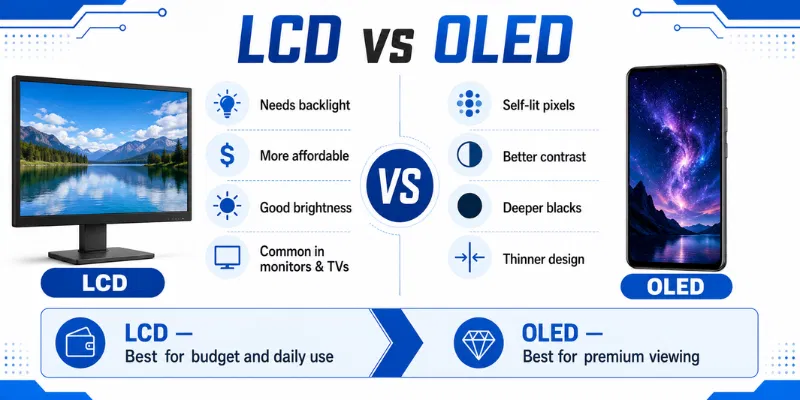
3. LCD vs OLED Comparison Table
| Feature | LCD | OLED |
|---|---|---|
| Light Source | Uses a separate backlight | Each pixel produces its own light |
| Black Levels | Black may appear slightly grey | Produces deep and true blacks |
| Contrast | Offers good contrast | Provides excellent contrast |
| Brightness | Usually stronger for full-screen brightness | Provides strong highlights and rich visuals |
| Response Time | Generally slower than OLED | Offers very fast pixel response |
| Burn-In Risk | Has very low burn-in risk | May develop burn-in over time |
| Price | Usually more affordable | Generally more expensive |
In the LCD vs OLED comparison, LCD is better for affordability, bright rooms, and long static-content use. OLED is more suitable for users who want deep blacks, strong contrast, fast response, and premium picture quality.
4. Differences Between LCD and OLED
LCD and OLED use different methods to create and control light. These differences affect picture quality, brightness, contrast, response time, design, power use, lifespan, and price. The following points explain the main differences in simple words.
1. Lighting Technology
LCD: LCD screens use a separate backlight behind the panel. Liquid crystals control how much light passes through each pixel. Modern LCD displays commonly use LED backlighting.
OLED: OLED screens do not require a separate backlight. Every pixel produces its own light and can work independently. This gives OLED better control over bright and dark areas.
2. Black Levels
LCD: The backlight remains active even when the screen shows dark content. Some light may pass through the panel, making black areas appear slightly grey. Advanced local dimming can improve black levels.
OLED: Each OLED pixel can switch off completely. This creates true black without unwanted light behind the image. Dark scenes therefore appear deeper and more detailed.
3. Contrast Ratio
LCD: LCD displays generally provide good contrast for daily use. However, the active backlight limits the difference between bright and dark areas. Mini-LED models can offer stronger contrast through local dimming.
OLED: OLED provides excellent contrast because bright pixels can remain active while nearby pixels switch off. This creates a strong difference between light and dark areas. Movies and games look more realistic as a result.
4. Screen Brightness
LCD: LCD screens often provide strong full-screen brightness. They can remain clearly visible in bright rooms and areas with natural light. Premium LCD and Mini-LED models can become extremely bright.
OLED: OLED displays produce bright highlights and rich visuals. However, brightness may reduce when a large part of the screen displays white content. Newer OLED models offer improved brightness compared with older versions.
5. Color Quality
LCD: A high-quality LCD can produce accurate and natural colors. Color quality depends on the panel type, backlight, settings, and calibration. IPS LCD screens are commonly preferred for wider color accuracy.
OLED: OLED displays usually produce rich, vivid, and attractive colors. Individual pixel control improves color depth and dark-scene detail. However, poorly adjusted settings may make colors appear overly saturated.
6. Viewing Angles
LCD: Colors and brightness may change when an LCD screen is viewed from the side. IPS panels offer wider viewing angles than TN and many VA panels. The exact performance depends on the panel quality.
OLED: OLED displays usually maintain clear colors and contrast from wider viewing positions. The picture remains consistent even when users sit away from the centre. This makes OLED suitable for group viewing.
7. Response Time
LCD: LCD pixels take some time to change from one color to another. Slow response may create motion blur during fast games or action scenes. Gaming LCD models reduce this problem with faster panels.
OLED: OLED pixels change almost instantly. This provides smoother motion and less visible blur during gaming and videos. Fast response is one of OLED’s strongest performance advantages.
8. Screen Thickness and Design
LCD: LCD screens require a backlight, liquid crystal layer, filters, and other components. These extra layers make the display thicker. However, modern LCD devices can still have slim designs.
OLED: OLED does not need a separate backlight, so it uses fewer display layers. This allows thinner, lighter, curved, and flexible screen designs. OLED is commonly used in foldable and premium devices.
9. Lifespan and Burn-In
LCD: LCD displays have a very low risk of permanent image burn-in. They are suitable for static content such as documents, menus, taskbars, and security screens. The backlight may gradually lose brightness over time.
OLED: OLED pixels naturally age as they produce light. Long-term display of the same logos, menus, or taskbars may cause permanent burn-in. Modern protection features reduce the risk but cannot remove it completely.
10. Price
LCD: LCD displays are widely available at affordable prices. Buyers can choose from budget, mid-range, and premium models. Repairs and replacements may also be easier to manage.
OLED: OLED screens generally cost more because of their advanced pixel technology and manufacturing process. Repair or panel replacement can also be expensive. In LCD vs OLED, OLED offers premium picture quality, while LCD provides better affordability and lower burn-in risk.
5. Advantages and Disadvantages of LCD and OLED
Both display technologies have their own strengths and limitations. In the LCD vs OLED comparison, LCD is usually better for affordability, brightness, and static content, while OLED offers deeper blacks, faster response, and premium picture quality.
| Advantages of LCD |
|---|
|
| Disadvantages of LCD |
|---|
|
| Advantages of OLED |
|---|
|
| Disadvantages of OLED |
|---|
|
6. Who Should Use an LCD Display?
An LCD display is suitable for users who want an affordable, bright, and reliable screen for daily use. It is especially practical for people who work with static content for long hours and want to avoid burn-in concerns. In the LCD vs OLED comparison, LCD is often the safer choice for work, study, and budget-focused setups.
- Office workers: LCD screens are suitable for documents, spreadsheets, emails, and other static content.
- Students: They work well for online classes, assignments, research, and general learning.
- Budget-conscious buyers: LCD displays are usually more affordable than OLED models.
- Users in bright rooms: Strong full-screen brightness helps improve visibility under room lighting.
- Long-hour computer users: LCD has a very low risk of permanent screen burn-in.
- Business and security users: Static menus, dashboards, and camera feeds can remain visible for long periods.
- Users needing easy replacement: LCD panels are widely available in many sizes and price ranges.
7. Who Should Use an OLED Display?
An OLED display is suitable for users who want premium picture quality, deep blacks, fast response, and rich colors. It works especially well for entertainment, gaming, and creative tasks where contrast and motion clarity matter. In the LCD vs OLED comparison, OLED is the better choice for users who value visual quality more than affordability.
- Movie lovers: OLED displays show deep blacks and detailed dark scenes.
- Gamers: Fast response time helps reduce motion blur during gameplay.
- Graphic designers: Strong contrast and rich colors support creative work.
- Photographers and video editors: OLED screens make dark details and highlights easier to review.
- Premium smartphone users: OLED supports thin designs, vivid visuals, and dark mode.
- Users watching from wide angles: Colors and contrast remain clear from different positions.
- People using screens in dark rooms: Excellent black levels improve night-time viewing.
8. Tips for Choosing Between LCD and OLED
Choosing the right display depends on your budget, room lighting, daily usage, and picture-quality needs. LCD is practical for long working hours and static content, while OLED is better for movies, gaming, and premium visuals. Consider these tips before making your final decision.
- Identify your main purpose before buying
- Choose LCD for long static content
- Select OLED for premium picture quality
- Consider room brightness and viewing conditions
- Compare burn-in risk and daily usage
- Check resolution, refresh rate, and brightness
- Review warranty and replacement costs carefully
LCD uses a separate backlight to make the image visible. OLED pixels produce their own light and can turn off individually. This allows OLED to provide deeper blacks and stronger contrast.
OLED is better for deep blacks, fast response, and premium picture quality. LCD is better for affordability, strong full-screen brightness, and long static-content use. The right choice depends on your budget and daily needs.
Yes, OLED may develop burn-in when the same image remains visible for long periods. Static logos, taskbars, and game controls can increase the risk. Modern protection features help reduce this problem.
LCD is usually better for office work and long document use. It has a very low risk of permanent burn-in from static menus and taskbars. It is also generally more affordable than OLED.
OLED is often better for gaming because it provides fast response and excellent contrast. It also displays dark scenes more clearly. However, users should vary content to reduce burn-in risk.
You can use a Screen Tester to check colors, brightness, dead pixels, and screen uniformity. Display solid black, white, red, green, and blue images across the panel. This can help you identify visible screen problems.
You should Test your Screen when it starts flickering, dimming, showing dead areas, or retaining images. Replacement may be needed when the damage affects normal use or repair costs are too high. Compare the repair price with the cost of a new display before deciding.
Conclusion
So guys, in this article, we’ve covered LCD vs OLED in detail. LCD displays are more affordable, bright, and suitable for long hours of static content, while OLED screens offer deeper blacks, faster response, and better picture quality. Personally, I recommend LCD for office work, study, and budget-friendly use, while OLED is the better choice for gaming, movies, and premium entertainment. Compare your budget, daily usage, and display needs before choosing the right screen.

- Be Respectful
- Stay Relevant
- Stay Positive
- True Feedback
- Encourage Discussion
- Avoid Spamming
- No Fake News
- Don't Copy-Paste
- No Personal Attacks
- Be Respectful
- Stay Relevant
- Stay Positive
- True Feedback
- Encourage Discussion
- Avoid Spamming
- No Fake News
- Don't Copy-Paste
- No Personal Attacks
