LCD vs LED: Which is Best For You
Published: 15 Oct 2026
LCD and LED are two common display terms used for televisions, monitors, laptops, and other electronic devices. Many people think they are completely different technologies, but most LED screens are actually LCD panels with LED backlighting. Understanding LCD vs LED can help you compare brightness, energy use, picture quality, thickness, lifespan, and price. This guide explains their differences in simple and beginner-friendly words.
1. What Is an LCD Display?
An LCD display is a flat-panel screen that uses liquid crystals to create images. LCD stands for Liquid Crystal Display, and the technology is commonly used in monitors, televisions, laptops, calculators, and digital devices. The liquid crystals do not produce light themselves, so the screen needs a separate backlight to make the image visible. Older LCD models often use fluorescent lamps, while many modern LCD screens use LED backlighting. In the LCD vs LED comparison, the main difference usually comes from the type of backlight used behind the liquid crystal panel.
2. What Is an LED Display?
An LED display is a screen that uses light-emitting diodes to provide brightness. In most modern monitors, televisions, and laptops, the LED lights work as the backlight behind an LCD panel. The liquid crystals still create the image, while the LEDs make it visible on the screen. LED-backlit displays are usually thinner, brighter, and more energy-efficient than older fluorescent-backlit LCD models. In the LCD vs LED comparison, LED mainly refers to the improved backlighting technology rather than a completely different display panel.
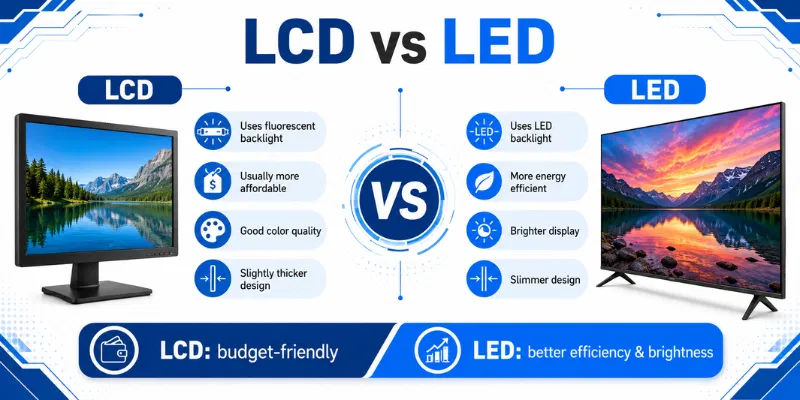
3. Major Differences Between LCD and LED
LCD and LED screens both commonly use liquid crystal technology, but their backlighting systems are different. These differences affect power consumption, picture quality, screen design, heat, lifespan, and price. Below is a detailed LCD vs LED comparison with separate explanations for each display type.
1. Backlight Technology
LCD: Traditional LCD screens use CCFL fluorescent lamps to provide light behind the liquid crystal panel. These lamps remain continuously active while the display is running. They also require more internal space.
LED: LED displays use small light-emitting diodes as the screen’s backlight. These lights may be placed around the edges or directly behind the panel. LED backlighting provides better control over brightness.
2. Energy Consumption
LCD: CCFL-backlit LCD screens generally consume more electrical power. Their fluorescent lamps require more energy to maintain screen brightness. This may increase electricity costs during long daily use.
LED: LED-backlit screens are more energy-efficient. They produce strong brightness while using less electricity. This makes them suitable for homes, offices, and devices used for many hours.
3. Screen Thickness
LCD: Traditional LCD screens are usually thicker because CCFL lamps require more internal space. Their larger backlight components can also increase the weight of the display. Older LCD TVs and monitors often have bulky designs.
LED: LED lights are smaller and require less space behind the panel. This allows manufacturers to create thinner and lighter displays. LED screens are easier to place on desks or mount on walls.
4. Picture Brightness
LCD: LCD displays provide enough brightness for basic home and office use. However, older fluorescent backlights may become dimmer over time. Their brightness may also appear less even across the screen.
LED: LED displays generally provide higher and more consistent brightness. They perform better in bright rooms and areas with strong lighting. Brightness can also be controlled more efficiently.
5. Contrast and Black Levels
LCD: Traditional LCD screens usually keep the entire backlight active. This can make dark scenes appear grey instead of completely black. Their contrast performance is often more limited.
LED: Some LED displays use local dimming to reduce light in dark screen areas. This improves black levels and creates stronger contrast. Full-array and Mini-LED models usually provide the best results.
6. Heat Production
LCD: Fluorescent-backlit LCD displays produce more heat during operation. Long usage sessions may make the screen’s rear panel feel warm. Excessive heat can also affect internal components over time.
LED: LED screens usually produce less heat because their backlights use energy more efficiently. Lower heat supports comfortable long-term use. It may also help protect internal components.
7. Lifespan
LCD: Traditional fluorescent backlights gradually lose brightness as they become older. Their lifespan depends on daily use, screen brightness, and ventilation. The backlight may eventually need repair or replacement.
LED: LED backlights generally provide a longer working lifespan. They maintain useful brightness for more operating hours. Proper care and moderate brightness settings can extend their life further.
8. Environmental Impact
LCD: Older CCFL backlights may contain small amounts of mercury. They also consume more electricity and produce additional heat. This makes disposal and energy use less environmentally friendly.
LED: LED backlights normally do not use mercury. Their lower energy consumption can reduce long-term electricity demand. They are generally considered a more environmentally friendly option.
9. Purchase Price
LCD: Traditional LCD displays are often available at lower prices. They can be suitable for basic tasks and users with limited budgets. However, older LCD models are becoming less common in the market.
LED: LED screens may cost more because they offer improved brightness, efficiency, and thinner designs. Models with HDR, full-array dimming, or Mini-LED technology cost even more. Their energy savings can provide better long-term value.
10. Availability and Common Uses
LCD: CCFL-backlit LCD screens are mainly found in older televisions, laptops, and computer monitors. They are less common in newly released products. Replacement parts may also become harder to find.
LED: Most modern televisions, laptops, monitors, and digital displays use LED backlighting. They are widely available in different sizes, resolutions, and price ranges. In Liquid Crystal Display vs Light Emitting Diode, LED is generally the more practical choice for modern users.
4. LCD vs LED Comparison Table
| Feature | LCD | LED |
|---|---|---|
| Backlight | Uses CCFL fluorescent lamps | Uses light-emitting diodes |
| Power Consumption | Consumes more electricity | Uses less electricity |
| Screen Thickness | Usually thicker and heavier | Usually thinner and lighter |
| Brightness | Provides moderate brightness | Offers higher brightness |
| Contrast | Has weaker black levels | Provides better contrast |
| Heat Production | Produces more heat | Produces less heat |
| Lifespan | Backlight may wear sooner | Usually lasts longer |
| Price | Often more affordable | Generally more expensive |
In the LCD vs LED comparison, LED displays usually provide better efficiency, brightness, contrast, and lifespan. Traditional LCD screens may still be suitable for users who need a basic and affordable display.
5. Advantages and Disadvantages of LCD and LED
Both LCD and LED displays offer clear images for everyday use, but their performance, power use, design, and price can differ. In the LCD vs LED comparison, traditional LCD models are usually more affordable, while LED displays provide better efficiency and modern features.
| Advantages of LCD |
|---|
|
| Disadvantages of LCD |
|---|
|
| Advantages of LED |
|---|
|
| Disadvantages of LED |
|---|
|
6. Who Should Choose LCD?
LCD screens are suitable for users who need a simple, affordable display for everyday tasks. They can provide clear images for basic work, study, browsing, and entertainment. In the LCD vs LED comparison, LCD may be a practical option when advanced brightness, thin design, and lower power use are not major priorities.
- Budget-conscious users: LCD screens are often cheaper than modern LED models.
- Office workers: They are suitable for documents, emails, spreadsheets, and basic software.
- Students: LCD displays can handle online classes, assignments, and general study needs.
- Home users: They work well for browsing, videos, and light entertainment.
- Users replacing older devices: LCD may be easier to match with older systems and basic setups.
7. Who Should Choose LED?
LED screens are suitable for users who want better brightness, lower power consumption, and a thinner display design. They are a practical choice for modern homes, offices, gaming setups, and entertainment systems. In the Liquid Crystal Display vs Light Emitting Diode comparison, LED is generally better for users who value efficiency, picture quality, and long-term performance.
- Regular daily users: LED screens work well for browsing, videos, study, and office tasks.
- Movie and entertainment lovers: Better brightness and contrast improve the viewing experience.
- Gamers: Modern LED displays support high refresh rates, clear motion, and strong visuals.
- Energy-conscious users: LED backlights consume less electricity during long use.
- Users wanting modern designs: LED screens are usually thinner, lighter, and easier to mount.
8. Tips for Choosing Between LCD and LED
Choosing the right display depends on your budget, daily use, room lighting, and picture-quality needs. In the LCD vs LED comparison, you should look beyond the display name and check practical features such as resolution, panel type, brightness, and warranty. These tips can help you make a better decision.
- Check your main purpose before buying
- Compare screen size and resolution carefully
- Choose IPS for wider viewing angles
- Check brightness for your room lighting
- Compare power use and long-term cost
- Review warranty and repair support
- Test the display before final purchase
The main difference is the backlight technology. Traditional LCD screens usually use fluorescent backlights, while LED screens use light-emitting diodes. Both commonly use liquid crystals to create the image.
Yes, most LED televisions and monitors are LED-backlit LCD screens. The liquid crystal panel creates the image, while LEDs provide the light behind it. Therefore, LED is usually an improved type of LCD display.
LED is generally better for everyday use because it consumes less power and provides stronger brightness. It also offers a thinner design and longer backlight life. LCD may still be suitable for basic tasks and limited budgets.
LED-backlit screens usually consume less electricity than traditional LCD models. Their smaller light-emitting diodes are more energy-efficient than fluorescent lamps. This can reduce long-term electricity costs.
LED displays often provide better brightness, contrast, and black levels. Models with local dimming can improve dark scenes further. However, the panel type, resolution, and overall screen quality also affect the final picture.
You can use a Screen Tester to check brightness, colors, dead pixels, and light bleeding. Display black, white, red, green, and blue images across the entire screen. This helps identify visible screen problems before buying or repairing it.
You should Test your Screen when it starts flickering, dimming, showing lines, or developing dead areas. Replacement may be necessary when repair costs are high or the backlight repeatedly fails. Compare the repair price with the cost of a new display before deciding.
Conclusion
So guys, in this article, we’ve covered LCD vs LED in detail. LCD screens can be a suitable choice for basic tasks and limited budgets, while LED displays offer better brightness, lower power consumption, and a thinner design. Personally, I recommend choosing an LED screen for modern daily use because it provides better efficiency and long-term value. Compare the features, price, and warranty before selecting the right display for your needs.

- Be Respectful
- Stay Relevant
- Stay Positive
- True Feedback
- Encourage Discussion
- Avoid Spamming
- No Fake News
- Don't Copy-Paste
- No Personal Attacks
- Be Respectful
- Stay Relevant
- Stay Positive
- True Feedback
- Encourage Discussion
- Avoid Spamming
- No Fake News
- Don't Copy-Paste
- No Personal Attacks
