Comparison between Capacitive vs Resistive Touch Screens
Published: 26 Sep 2026
Capacitive and resistive touch screens are two widely used touch technologies found in phones, tablets, ATMs, medical equipment, and industrial machines. Capacitive screens detect electrical changes, while resistive screens respond to physical pressure. This Capacitive vs Resistive Touch Screens comparison explains their working methods, features, advantages, disadvantages, and best uses.
1. What Is a Capacitive Touch Screen?
A capacitive touch screen is a display that detects touch through changes in electrical charge. It contains a transparent conductive layer beneath the glass surface. When a finger touches the screen, it changes the electrical field at that point. The touch controller identifies the location and sends the command to the device. Capacitive screens respond to light touch and commonly support gestures such as swiping, scrolling, and pinch-to-zoom. They are widely used in smartphones, tablets, touchscreen laptops, and modern control panels. In Capacitive vs Resistive Touch Screens, capacitive technology usually offers faster response, smoother navigation, and better multi-touch support.
2. What Is a Resistive Touch Screen?
A resistive touch screen is a display that detects input through physical pressure. It contains two thin conductive layers separated by a small gap. When a finger, glove, pen, or stylus presses the surface, the layers touch each other at that point. The controller detects the electrical change and calculates the exact touch location. Resistive screens usually require firmer pressure and often support only single-touch input. They are commonly used in ATMs, industrial machines, medical equipment, and older handheld devices. In Capacitive vs Resistive Touch Screens, resistive technology is more flexible with input objects but usually offers lower clarity and less smooth navigation.
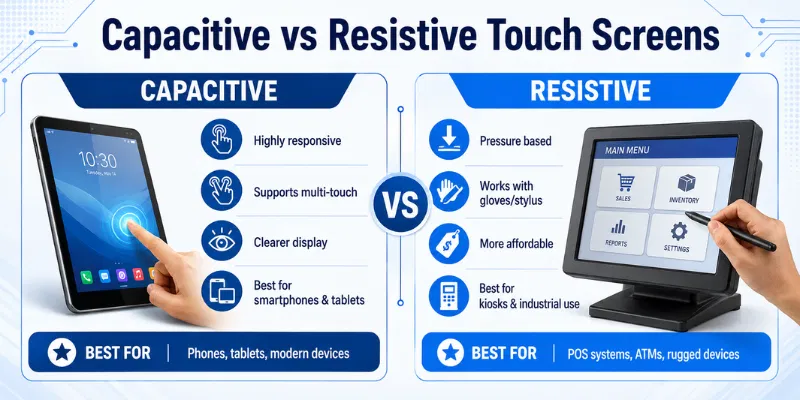
3. Detailed Difference Between Capacitive and Resistive Touch Screens
Capacitive and resistive touch screens both allow users to control a device by touching the display, but they use different technologies. The following points explain their main differences in simple words.
1. Touch Detection Method
A capacitive touch screen detects changes in electrical charge when a finger touches the surface. It uses a transparent conductive layer below the glass. A resistive touch screen detects physical pressure when two conductive layers make contact.
2. Input Method
A capacitive screen works best with bare fingers or a compatible capacitive stylus. Ordinary pens, plastic objects, and some gloves may not work properly. A resistive screen can respond to fingers, gloves, pens, and almost any object that applies pressure.
3. Pressure Requirement
Capacitive technology responds to a light touch, so users do not need to press hard. This makes tapping and swiping feel smooth and quick. Resistive screens usually require firmer pressure to bring the internal layers together.
4. Multi-Touch Support
Capacitive screens commonly support multiple touch points at the same time. Users can pinch to zoom, rotate images, and use two-finger gestures. Most resistive screens support only one touch point, although some advanced models may offer limited multi-touch.
5. Touch Response and Speed
Capacitive screens generally provide faster and smoother touch response. They are suitable for quick scrolling, gaming, app navigation, and modern gestures. Resistive screens may feel slower because physical pressure is required for each action.
6. Accuracy
Capacitive screens offer smooth finger tracking and accurate gesture control. However, selecting very small items with a finger may sometimes be difficult. Resistive screens can provide precise single-point input when used with a fine stylus.
7. Display Clarity
Capacitive touch screens usually provide better brightness, sharpness, and color clarity. Their sensor layer allows more light to pass through the display. Resistive screens contain additional flexible layers that may slightly reduce image brightness and clarity.
8. Surface Material
A capacitive screen normally uses a hard glass surface. This gives it a smooth feel and better scratch resistance during normal use. A resistive screen uses a flexible top layer that can become scratched, worn, or damaged over time.
9. Glove Support
Standard capacitive screens may not respond to ordinary gloves because they require a conductive input. Special touchscreen gloves or increased sensitivity settings may solve this problem. Resistive screens usually work well with all types of gloves because they detect pressure instead of electrical charge.
10. Stylus Compatibility
Capacitive screens require a compatible capacitive or active digital stylus. Advanced active pens may support pressure sensitivity, palm rejection, and detailed drawing. Resistive screens can work with simple plastic styluses, pens, or other pointed objects without special electronics.
11. Water and Moisture Response
Water or moisture can interfere with capacitive sensing and may cause missed taps or ghost touches. Modern devices may reduce this issue through improved software and protective designs. Resistive screens can sometimes work better in wet environments because they depend on pressure, although water can still affect damaged panels.
12. Durability
Capacitive screens are generally durable because of their strong glass surface. However, a hard impact can crack the glass and affect the touch sensor. Resistive screens may survive some impacts, but their flexible surface is more likely to scratch or wear through repeated use.
4. Capacitive vs Resistive Touch Screens Comparison
The table below explains the main differences between capacitive and resistive touch screens in simple words.
| Feature | Capacitive Touch Screen | Resistive Touch Screen |
|---|---|---|
| Detection Method | Detects changes in electrical charge | Detects physical pressure |
| Main Input | Finger or compatible stylus | Finger, glove, pen, or ordinary stylus |
| Touch Pressure | Responds to a light touch | Requires firmer pressure |
| Multi-Touch Support | Commonly supports multiple fingers | Usually supports one touch point |
| Response Speed | Fast and smooth | Slightly slower |
| Accuracy | Good for finger tracking and gestures | Precise for single-point input |
| Display Clarity | Usually brighter and clearer | Extra layers may reduce clarity |
| Surface Material | Hard glass surface | Flexible plastic or coated surface |
| Scratch Resistance | Better resistance during normal use | More likely to scratch or wear |
| Glove Support | Limited with ordinary gloves | Works well with most gloves |
| Stylus Support | Needs a compatible capacitive or active stylus | Works with simple pens and styluses |
In Capacitive vs Resistive Touch Screens, capacitive technology is better for modern consumer devices because it offers fast response, clear visuals, and multi-touch support. Resistive technology is more suitable for industrial environments where users may wear gloves or use basic styluses.
5. Advantages and Disadvantages of Capacitive Touch Screen
A capacitive touch screen offers smooth navigation, quick response, and multi-touch support. However, it also has some limitations related to gloves, moisture, cost, and repair.
| Advantages of Capacitive Touch Screen |
|---|
|
| Disadvantages of Capacitive Touch Screen |
|---|
|
6. Advantages and Disadvantages of Resistive Touch Screen
A resistive touch screen works through physical pressure and can respond to fingers, gloves, pens, and ordinary styluses. It is practical for industrial systems, medical devices, ATMs, and other environments where flexible input matters.
| Advantages of Resistive Touch Screen |
|---|
|
| Disadvantages of Resistive Touch Screen |
|---|
|
7. Who Should Use Capacitive Touchscreens?
Capacitive touchscreens are suitable for users who want fast response, smooth navigation, and modern touch gestures. They work best in clean environments where users mainly control the screen with their fingers or compatible styluses.
- Smartphone and tablet users: Capacitive screens support smooth scrolling, swiping, gaming, and pinch-to-zoom gestures.
- Students and office workers: They are useful for reading, browsing, taking notes, attending online classes, and completing daily tasks.
- Artists and designers: Devices with active stylus support allow users to draw, sketch, and write with better control.
- Laptop and 2-in-1 device users: Capacitive touchscreens make it easier to open apps, move through menus, and use creative software.
- Retail and kiosk operators: Modern capacitive displays offer a clean appearance, fast input, and an easy customer experience.
- Home users: They are suitable for smart displays, kitchen screens, home control panels, and entertainment devices.
- Users who need multi-touch gestures: Capacitive technology is ideal for people who frequently zoom, rotate, scroll, or use several fingers at once.
- Users who prefer clear display quality: These screens usually offer better brightness, sharpness, and image clarity than resistive models.
In Capacitive vs Resistive Touch Screens, capacitive technology is the better choice for modern consumer devices and gesture-based applications. However, it may not be ideal for users who regularly wear thick gloves or work in wet, dusty, or demanding industrial environments.
8. Who Should Use Resistive Touchscreens?
Resistive touchscreens are suitable for users who need pressure-based control, glove support, and accurate single-point input. They are especially useful in workplaces where smooth gestures and multi-touch features are less important.
- Industrial workers: Resistive screens work well in factories, warehouses, and workshops where users often wear thick protective gloves.
- Medical professionals: Doctors, nurses, and technicians can operate these screens with gloves, pens, or simple styluses.
- ATM and kiosk users: Resistive technology is suitable for basic menus, payment systems, ticket machines, and public information displays.
- Point-of-sale operators: Retail workers can use a finger, glove, or stylus to select products and complete transactions.
- Users who need precise input: A simple stylus can help users select small buttons, enter signatures, or control detailed menus accurately.
- People working in dusty environments: Resistive screens can be useful in areas where dust, dirt, or other materials may affect normal finger input.
- Users with a limited budget: Resistive touchscreen systems are generally more affordable than capacitive models.
- People who do not need multi-touch gestures: These screens are suitable for basic tapping, data entry, and menu selection.
9. Tips for Choosing Between Capacitive and Resistive Touch Screens
Choosing the right touchscreen depends on how, where, and by whom the device will be used. Consider these practical tips before making a decision.
- Check the main purpose: Choose a capacitive screen for smartphones, tablets, laptops, and gesture-based applications. Select a resistive screen for basic controls, industrial machines, and data-entry systems.
- Consider glove use: Resistive touchscreens usually work with ordinary and protective gloves. Capacitive screens may require special conductive gloves.
- Think about multi-touch gestures: Choose capacitive technology when users need pinch-to-zoom, rotation, gaming, or two-finger scrolling.
- Check stylus requirements: Resistive screens work with basic plastic styluses and other pressure-based objects. Capacitive screens need a compatible capacitive or active stylus.
- Evaluate the working environment: Resistive screens may be more practical in dusty, dirty, or industrial workplaces. Capacitive screens are usually better for clean indoor environments.
- Compare display quality: Capacitive screens generally provide brighter images, sharper text, and clearer colors. Resistive screens may look slightly dimmer because of their additional layers.
- Consider touch accuracy: Resistive technology can provide precise single-point selection with a fine stylus. Capacitive technology is better for smooth finger tracking and gestures.
- Check the budget: Resistive touchscreens are generally more affordable. Capacitive screens may cost more but offer faster response and advanced features.
10. Common Mistakes When Choosing Between Capacitive and Resistive Touch Screens
Choosing the wrong touchscreen can reduce performance, increase repair costs, and make the device difficult to use. Avoid these common mistakes when comparing Capacitive vs Resistive Touch Screens.
- Choosing only based on price: A cheaper touchscreen may not provide the durability, accuracy, or features you need. Consider long-term value instead of only the purchase price.
- Ignoring glove requirements: Standard capacitive screens may not work properly with thick or ordinary gloves. Resistive screens are usually more suitable for glove-based use.
- Assuming both support multi-touch: Capacitive screens commonly support gestures such as pinch-to-zoom and two-finger scrolling. Most resistive screens support only single-touch input.
- Not checking stylus compatibility: Capacitive screens require a compatible capacitive or active stylus. Resistive screens can work with ordinary plastic styluses and other pressure-based objects.
- Ignoring the working environment: Dust, moisture, dirt, temperature, and outdoor conditions can affect touchscreen performance. Choose a screen designed for the environment where it will be used.
- Overlooking display quality: Capacitive screens generally provide brighter and clearer visuals. The additional layers in resistive screens may slightly reduce brightness and sharpness.
- Expecting light-touch response from resistive screens: Resistive screens need physical pressure to detect input. They may feel slower to users who are familiar with modern smartphone screens.
A capacitive screen detects changes in electrical charge. A resistive screen detects physical pressure between two conductive layers. Capacitive screens feel smoother, while resistive screens work with more input objects.
Capacitive touchscreens are better for modern smartphones. They support light touch, smooth scrolling, and multi-touch gestures. Resistive screens are now uncommon in consumer smartphones.
Yes, resistive touchscreens usually work with ordinary and protective gloves. They respond to pressure instead of electrical conductivity. This makes them suitable for industrial and medical environments.
Yes, but they require a compatible capacitive or active stylus. Ordinary plastic styluses may not work properly. Active pens can also support drawing, handwriting, and pressure sensitivity.
Capacitive touchscreens usually provide brighter and clearer visuals. Resistive screens contain extra layers that may slightly reduce brightness and sharpness. However, the final quality also depends on the display panel.
Resistive touchscreens are generally more affordable. Their design is simpler and usually does not require advanced multi-touch controllers. Capacitive screens cost more but provide smoother performance and modern features.
Resistive touchscreens are often better for industrial use. They work with gloves, pens, and simple styluses and provide accurate single-point input. Capacitive screens may still be suitable when clear visuals and multi-touch gestures are required.
Conclusion
So guys, in this article, we’ve covered Capacitive vs Resistive Touch Screens in detail. Capacitive screens offer fast response, clear visuals, and smooth multi-touch gestures, while resistive screens are better for glove use, simple styluses, and pressure-based control. Personally, I recommend choosing a capacitive screen for modern consumer devices and a resistive screen for industrial or professional environments. Compare your needs, working conditions, input method, and budget before selecting the right touchscreen.

- Be Respectful
- Stay Relevant
- Stay Positive
- True Feedback
- Encourage Discussion
- Avoid Spamming
- No Fake News
- Don't Copy-Paste
- No Personal Attacks
- Be Respectful
- Stay Relevant
- Stay Positive
- True Feedback
- Encourage Discussion
- Avoid Spamming
- No Fake News
- Don't Copy-Paste
- No Personal Attacks
