Major Types of Touch Sensors that You Should Known
Published: 22 Sep 2026
Touch sensors are used in smartphones, tablets, laptops, ATMs, cars, appliances, and many industrial machines. They detect a finger, stylus, pressure, light interruption, or electrical change and convert it into a command. This guide explains the main Types of Touch Sensors, how they work, and where each one is commonly used.
1. What Is a Touch Sensor?
A touch sensor is an electronic component that detects when a finger, stylus, hand, or other object touches or comes close to a surface. It converts the touch into an electrical signal and sends that information to the device controller. The device then performs an action, such as opening an app, selecting an option, turning on a light, or moving an object on the screen. Touch sensors can detect input through pressure, electrical charge, infrared light, sound waves, or electromagnetic changes. They are commonly used in smartphones, tablets, laptops, ATMs, cars, appliances, and industrial machines. Different Types of Touch Sensors are designed for different levels of accuracy, durability, input method, and working environment.
2. How Does a Touch Sensor Work?
A touch sensor works by detecting a change when a finger, stylus, or another object touches its surface. Depending on the sensor type, this change may involve electrical charge, physical pressure, infrared light, sound waves, or an electromagnetic field. The sensor converts the detected change into an electrical signal and sends it to a controller. The controller then calculates the touch location and identifies the action performed by the user. After processing the information, the device responds by opening an app, selecting an option, moving an object, or activating a command. Different Types of Touch Sensors follow slightly different detection methods, but they all convert physical interaction into a digital response.
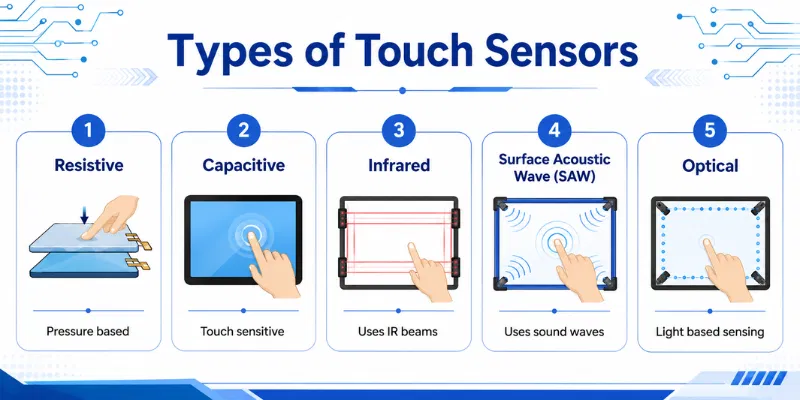
3. Main Components of a Touch Sensor
A touch sensor includes several parts that work together to detect touch and send the correct command to a device. The design may change across different Types of Touch Sensors, but the basic components are usually similar.
1. Touch-Sensitive Surface
The touch-sensitive surface is the area that receives input from a finger, stylus, or another object. It may be made of glass, plastic, or another protective material. This surface allows the sensor to detect contact without exposing the internal parts.
2. Sensor Layer
The sensor layer detects the actual change caused by touch. Depending on the technology, it may respond to electrical charge, pressure, infrared light, sound waves, or electromagnetic signals. This is the main part responsible for identifying user input.
3. Controller
The controller receives signals from the sensor layer and processes them. It calculates the touch position, movement, and type of action. It then sends the information to the device’s operating system or software.
4. Circuit Board
The circuit board connects the sensor, controller, and other electronic parts. It carries electrical signals between these components. It also helps provide power and stable communication within the touch system.
5. Software or Driver
The software or driver helps the device understand the signals sent by the touch sensor. It converts taps, swipes, and gestures into commands. Without the correct driver, the touch surface may respond slowly or stop working.
6. Protective Layer
The protective layer covers the touch sensor and helps prevent scratches, dust, moisture, and physical damage. It also keeps the surface smooth for better finger movement. Strong or damaged protection can sometimes reduce touch sensitivity.
4. Types of Touch Sensors
Different Types of Touch Sensors use different methods to detect a finger, stylus, pressure, light, or movement. Some are designed for smartphones and laptops, while others are more suitable for industrial machines, kiosks, and large interactive displays. The following six touch sensor types are commonly used in modern devices.
1. Capacitive Touch Sensor
A capacitive touch sensor detects changes in electrical charge when a finger touches the surface. It is widely used in smartphones, tablets, touchscreen laptops, and modern control panels. This sensor offers fast response, smooth navigation, and support for multi-touch gestures.
Working:
A transparent conductive layer is placed below the screen surface. When a finger touches the display, it changes the electrical field at that location. The controller measures this change, identifies the touch position, and sends the command to the device.
Advantages:
- Provides fast and accurate touch response.
- Supports multi-touch gestures such as zooming and rotating.
- Offers clear display quality.
- Uses a durable glass surface.
- Works well for smartphones, tablets, and laptops.
Disadvantages:
- May not work with ordinary gloves.
- Requires a compatible stylus for accurate writing.
- Moisture can sometimes affect touch response.
- Usually costs more than resistive technology.
- A cracked surface may stop touch functions.
2. Resistive Touch Sensor
A resistive touch sensor detects physical pressure applied to the screen. It commonly uses two thin conductive layers separated by a small gap. This type is often found in ATMs, industrial machines, medical equipment, and older touchscreen devices.
Working:
When the user presses the screen, the upper flexible layer touches the lower conductive layer. This contact changes the electrical signal at that point. The controller calculates the touch location and performs the selected action.
Advantages:
- Works with fingers, gloves, pens, and ordinary styluses.
- Offers affordable touch technology.
- Responds to physical pressure.
- Suitable for industrial and outdoor environments.
- Provides accurate single-point input.
Disadvantages:
- Usually offers limited multi-touch support.
- Requires more pressure than capacitive sensors.
- Extra layers can reduce display brightness and clarity.
- The flexible surface may scratch or wear over time.
- Touch response may feel slower.
3. Infrared Touch Sensor
An infrared touch sensor uses invisible light beams around the edges of a screen. It does not require a special touch-sensitive layer over the display. These sensors are commonly used in interactive whiteboards, kiosks, public displays, and large touch monitors.
Working:
Infrared transmitters and receivers create a grid of light beams across the screen. When a finger, glove, or object touches the surface, it blocks some of these beams. The controller identifies the blocked position and converts it into a touch command.
Advantages:
- Works with fingers, gloves, styluses, and other objects.
- Supports large screen sizes.
- Offers good display clarity because no extra layer covers the screen.
- Can support multi-touch input.
- Requires little pressure to respond.
Disadvantages:
- Dust and dirt can block infrared beams.
- Strong sunlight may affect performance.
- Sensors around the edges need additional space.
- Accidental objects may trigger unwanted input.
- Usually costs more than simple resistive systems.
4. Surface Acoustic Wave Touch Sensor
A Surface Acoustic Wave sensor uses ultrasonic sound waves that move across the screen surface. When a user touches the display, part of the wave is absorbed. This technology is often used in kiosks, gaming machines, information terminals, and public control systems.
Working:
Transmitters send ultrasonic waves across the glass surface. Receivers monitor these waves continuously. When a finger touches the screen, it interrupts or absorbs part of the signal, allowing the controller to calculate the touch location.
Advantages:
- Provides clear and bright image quality.
- Offers accurate touch detection.
- Uses a durable glass surface.
- Does not need a flexible pressure layer.
- Works well for public information systems.
Disadvantages:
- Water, dust, and dirt can affect response.
- May not work properly with hard objects.
- Requires regular cleaning.
- Usually costs more than resistive technology.
- Touch performance may decrease in dirty environments.
5. Optical Touch Sensor
An optical touch sensor uses cameras, light sources, or optical detectors to identify the position of a finger or object. It is commonly used in interactive tables, smart boards, digital signs, and large touchscreen displays. Optical technology can cover large areas without placing a thick sensor layer over the screen.
Working:
Small cameras or optical sensors are placed around the display edges. They monitor the screen surface and detect changes when a finger or object touches it. The controller uses the captured information to calculate the exact touch location.
Advantages:
- Suitable for large touch displays.
- Supports multi-touch in many systems.
- Works with fingers, gloves, and different objects.
- Maintains good display brightness.
- Does not require pressure to detect input.
Disadvantages:
- External lighting may affect accuracy.
- Cameras and sensors require proper calibration.
- The system can be more expensive.
- Dirt around the sensor area may reduce performance.
- Large setups may require more installation space.
6. Piezoelectric Touch Sensor
A piezoelectric touch sensor detects pressure through materials that generate an electrical charge when pressed. It is commonly used in control panels, industrial equipment, appliances, and sealed touch buttons. This sensor is known for strength, durability, and resistance to harsh conditions.
Working:
The sensor contains piezoelectric material below the touch surface. When the user presses the surface, the material produces a small electrical charge. The controller detects this charge and activates the required command.
Advantages:
- Offers strong durability.
- Works with gloves and different objects.
- Suitable for sealed and waterproof control panels.
- Performs well in industrial environments.
- Can detect different pressure levels.
Disadvantages:
- Usually requires physical pressure.
- May not support smooth swiping or multi-touch gestures.
- Can cost more than simple mechanical buttons.
- Requires proper calibration.
- Is less common in smartphones and consumer laptops.
7. Force-Sensitive Resistor (FSR)
A Force-Sensitive Resistor is a thin pressure sensor whose electrical resistance changes when force is applied. It is commonly used in pressure-sensitive buttons, musical devices, robotic systems, medical equipment, and control panels. Unlike a standard touchscreen, an FSR mainly measures the presence and approximate amount of pressure rather than the exact position across a large display.
Working:
An FSR contains conductive layers separated by a special pressure-sensitive material. When a user presses the surface, the conductive parts make greater contact and the electrical resistance decreases. A controller measures this resistance change and converts it into a touch or pressure command.
Advantages:
- Detects both touch and pressure level.
- Has a thin and lightweight design.
- Can be placed under buttons and other surfaces.
- Uses simple electronic circuits.
- Works well in control panels and wearable devices.
- Is available in different shapes and sizes.
Disadvantages:
- Does not measure force as accurately as a load cell.
- Readings may vary with temperature and repeated use.
- Requires calibration for better results.
- May become less consistent over time.
- Is not suitable for precise multi-touch displays.
- Performance depends on how force is applied.
8. Acoustic Touch Sensor
An acoustic touch sensor detects the sound or vibration produced when a user taps a solid surface. It can turn glass, metal, plastic, or another suitable material into an interactive control area. This technology is useful for touch buttons, home automation systems, kiosks, and specialised interactive surfaces.
Working:
When a finger taps the surface, the impact creates a unique pattern of sound waves. Piezoelectric sensors or microphones detect these waves as they travel through the material. The controller compares the acoustic pattern with stored data to identify the touch location or command.
Advantages:
- Can detect touch on different solid materials.
- Does not always require a transparent sensor layer.
- Can turn ordinary surfaces into control panels.
- Supports sealed and clean device designs.
- May cover a large touch area with few sensors.
- Works through glass, plastic, or metal surfaces.
Disadvantages:
- External vibration and noise may affect detection.
- Different materials require separate calibration.
- Surface thickness can change performance.
- Soft touches may be difficult to detect.
- Damage to the surface may change the acoustic pattern.
- Advanced signal-processing software may be required.
9. Ultrasonic Touch Sensor
An ultrasonic touch sensor uses high-frequency sound waves that travel through or across a surface. A finger touching the surface changes the movement, reflection, or strength of these waves. The system analyses this change to calculate the touch location. Ultrasonic guided-wave systems can detect touch on thin glass and other solid surfaces.
Working:
Small transmitters send ultrasonic waves through the touch surface. Receivers continuously measure the normal wave pattern. When a finger or stylus touches the surface, it absorbs, reflects, or interrupts part of the wave, allowing the controller to identify the contact position.
Advantages:
- Can work on glass and other solid surfaces.
- Does not require a visible sensor grid.
- Maintains good display clarity.
- Can detect touch over a large area.
- Supports sealed and durable designs.
- May detect movement after the initial touch.
Disadvantages:
- Requires accurate signal processing and calibration.
- Dirt, mounting conditions, or surface damage may affect waves.
- External vibrations can reduce accuracy.
- System design can be complex.
- Touch position may be less precise in basic systems.
- Transmitters and receivers can increase cost.
10. Near-Field Imaging (NFI) Sensor
A Near-Field Imaging sensor is a specialised touch technology that uses an electrostatic or electromagnetic field to detect input. It is related to capacitive sensing but is designed for stronger performance in industrial and harsh environments. NFI systems have been used in point-of-sale terminals, industrial controls, and public systems where users may wear gloves or where dirt and moisture are present.
Working:
A conductive sensor layer creates a controlled electrical field across the touch surface. When a finger, gloved hand, or another suitable object touches or approaches it, the field changes at that location. The controller measures the change and calculates the touch position.
Advantages:
- Can work with different types of gloves.
- Performs well through dirt and some contaminants.
- Supports strong protective glass.
- Suitable for sealed industrial systems.
- Offers good resistance to impact and moisture.
- Provides clear image transmission.
Disadvantages:
- More expensive than basic touch technologies.
- Requires specialised controllers and installation.
- Is less common in modern consumer devices.
- Calibration may be needed for different surfaces.
- Electromagnetic interference can affect performance.
- Replacement parts may be difficult to find.
5. Which Touch Sensor Is Best?
There is no single touch sensor that is best for every device. The right choice depends on the required accuracy, environment, input method, screen size, durability, and budget. Among the different Types of Touch Sensors, each option is suitable for a specific purpose.
1. Best for Smartphones and Tablets: Capacitive Sensor
A capacitive touch sensor is the best choice for smartphones, tablets, and modern touchscreen laptops. It provides fast response, smooth navigation, and multi-touch gestures such as zooming and rotating. However, it may not work properly with ordinary gloves or non-compatible styluses.
2. Best for Industrial Machines: Resistive Sensor
A resistive touch sensor is suitable for factories, medical equipment, and industrial control systems. It works with fingers, gloves, pens, and ordinary styluses because it detects physical pressure. It is also affordable, but its image clarity and multi-touch support are limited.
3. Best for Large Interactive Displays: Infrared Sensor
An infrared touch sensor is a strong option for interactive whiteboards, kiosks, and large monitors. It works with fingers, gloves, and different objects without requiring pressure. However, dust, sunlight, and blocked light beams may affect its performance.
4. Best for Public Kiosks: Surface Acoustic Wave Sensor
A Surface Acoustic Wave sensor works well in public information terminals and indoor kiosks. It provides accurate touch detection and clear image quality. Regular cleaning is important because dust, water, and dirt can interrupt the sound waves.
5. Best for Smart Boards: Optical Sensor
An optical touch sensor is ideal for smart boards, interactive tables, and large educational displays. It can support multiple touch points and works with different input objects. Proper lighting and calibration are necessary for reliable accuracy.
6. Best for Waterproof Controls: Piezoelectric Sensor
A piezoelectric touch sensor is suitable for sealed control panels, appliances, and harsh industrial environments. It offers excellent durability and can work through strong protective surfaces. However, it usually requires pressure and is not designed for smooth gestures.
7. Final Recommendation
For most consumer devices, a capacitive touch sensor is the best overall option because it is fast, accurate, durable, and supports multi-touch. Resistive sensors are better for glove use and industrial work, while infrared and optical sensors are suitable for large displays. Always choose the sensor according to the device, working environment, required input method, and budget.
6. Common Problems With Touch Sensors
Touch sensors may develop problems because of dirt, moisture, damaged hardware, incorrect calibration, or outdated software. These issues can affect different Types of Touch Sensors, although the exact cause may depend on the technology being used.
1. Touch Not Responding
Sometimes the sensor does not detect taps, swipes, or pressure. This may happen because of a damaged sensor layer, disabled settings, outdated drivers, or a frozen device. Restarting the device and checking the touch settings may solve the issue.
2. Ghost Touches
Ghost touches occur when the device performs actions without being touched. Apps may open, menus may move, or random points may be selected automatically. Moisture, a cracked screen, a faulty charger, or damaged touch hardware can cause this problem.
3. Incorrect Touch Position
The device may register a touch in a different area from where the user pressed. This usually happens because of poor calibration, software problems, or sensor misalignment. Recalibrating the touch system can improve accuracy.
4. Dead Touch Areas
Some parts of the touch surface may stop responding completely. The center may work while the corners or edges fail to detect input. This problem often indicates damage to the sensor layer or internal connection.
5. Slow Touch Response
A delayed response can make the device feel difficult to use. Low system performance, outdated drivers, heavy software, or a weak sensor may create this issue. Closing unnecessary apps and updating the software may improve response speed.
6. Multi-Touch Gestures Not Working
Pinch-to-zoom, rotation, or two-finger gestures may stop working even when basic tapping still functions. This can happen because of disabled gesture settings, driver issues, or limited sensor support. Users should also confirm that the device supports multi-touch.
The main types include capacitive, resistive, infrared, Surface Acoustic Wave, optical, and piezoelectric sensors. Each one detects touch through a different method. The right choice depends on the device, environment, and input requirements.
Most smartphones use capacitive touch sensors. They provide fast response, smooth navigation, and support for multi-touch gestures. They also work well with fingers and compatible styluses.
Resistive and infrared sensors usually work well with gloves. Resistive sensors detect pressure, while infrared sensors detect blocked light beams. This makes them useful in industrial and outdoor environments.
A capacitive sensor detects changes in electrical charge. A resistive sensor responds to physical pressure on the surface. Capacitive sensors are usually smoother, while resistive sensors work with more input objects.
Yes, some touch sensors support multi-touch input. Capacitive, infrared, and optical systems commonly detect more than one finger. This allows gestures such as zooming, rotating, and two-finger scrolling.
A touch sensor may stop working because of dirt, moisture, outdated drivers, damaged hardware, or incorrect settings. Thick screen protectors can also reduce sensitivity. Cleaning the surface and restarting the device may solve simple problems.
Tap the center, corners, and edges of the touch surface. Also test scrolling, swiping, multi-touch gestures, and stylus input where supported. Watch for dead areas, delayed response, inaccurate touches, or ghost touches.
Conclusion
So guys, in this article, we’ve covered Types of Touch Sensors in detail. We discussed capacitive, resistive, infrared, Surface Acoustic Wave, optical, and piezoelectric sensors along with their working methods, benefits, limitations, and common uses. I personally recommend capacitive sensors for smartphones and modern consumer devices, while resistive or piezoelectric sensors are better for industrial environments. Compare the device, input method, accuracy, durability, and budget before choosing the right touch sensor.

- Be Respectful
- Stay Relevant
- Stay Positive
- True Feedback
- Encourage Discussion
- Avoid Spamming
- No Fake News
- Don't Copy-Paste
- No Personal Attacks
- Be Respectful
- Stay Relevant
- Stay Positive
- True Feedback
- Encourage Discussion
- Avoid Spamming
- No Fake News
- Don't Copy-Paste
- No Personal Attacks
